
How interpreter ranking works
What goes into the Fluent score that orders interpreters and partner agencies on the Assignment step, and how to read its tooltip.
What you'll learn
- What decides the order of interpreters when you assign an appointment, and how to read each one's score.
What Fluent ranks
Owners, Admins, Managers, and Schedulers at your agency see the ranked list when they create or edit an appointment. Fluent ranks it from the customer, the language, and the service type you entered on Details.
- Who's in the list: Your interpreter team and, when you use Assign, your partner agencies. Eligibility and booking conflicts says who appears in the list at all.
- Equal scores: An interpreter who can make the time goes first, then interpreters before partner agencies, then by name.
Read the score breakdown
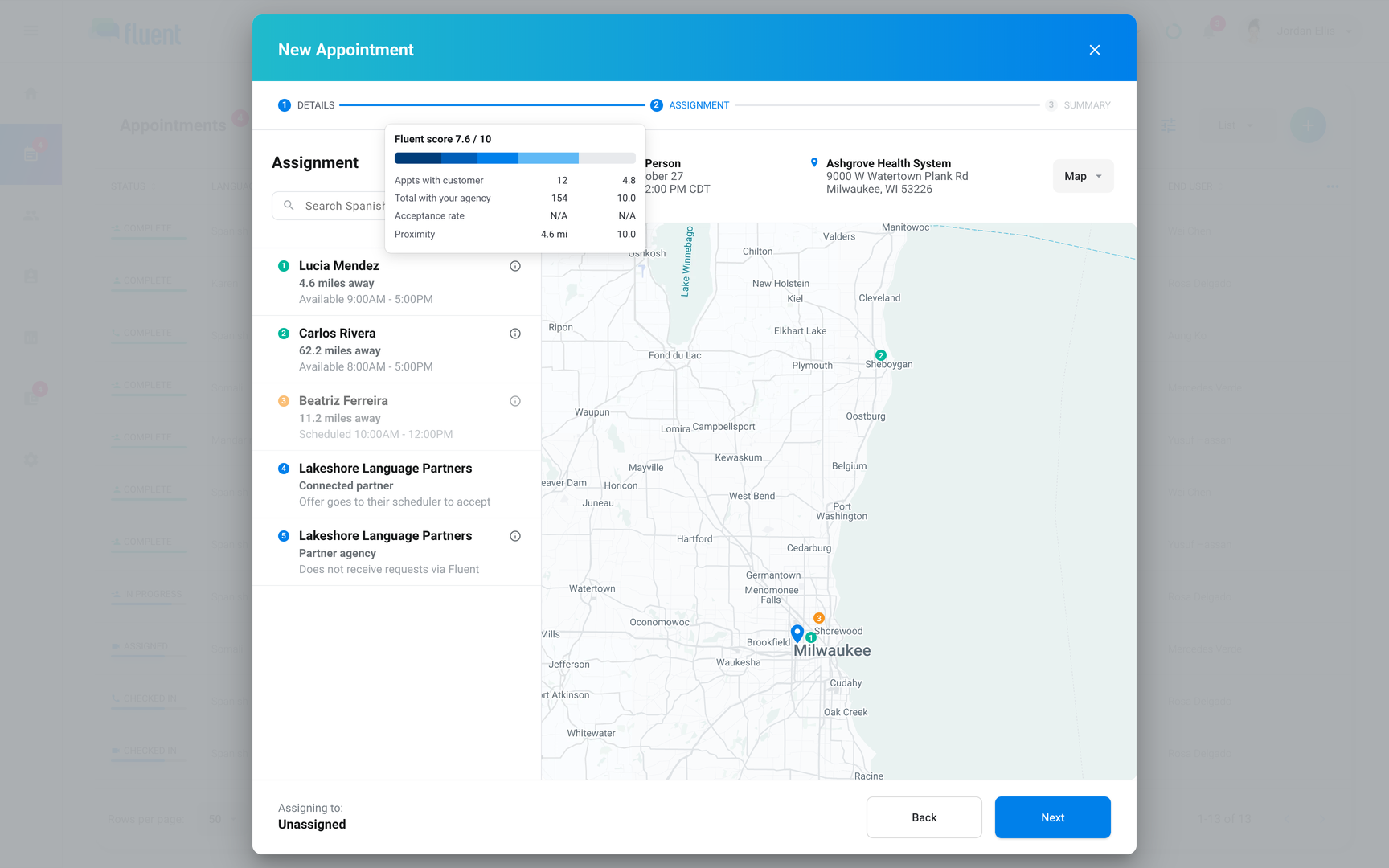
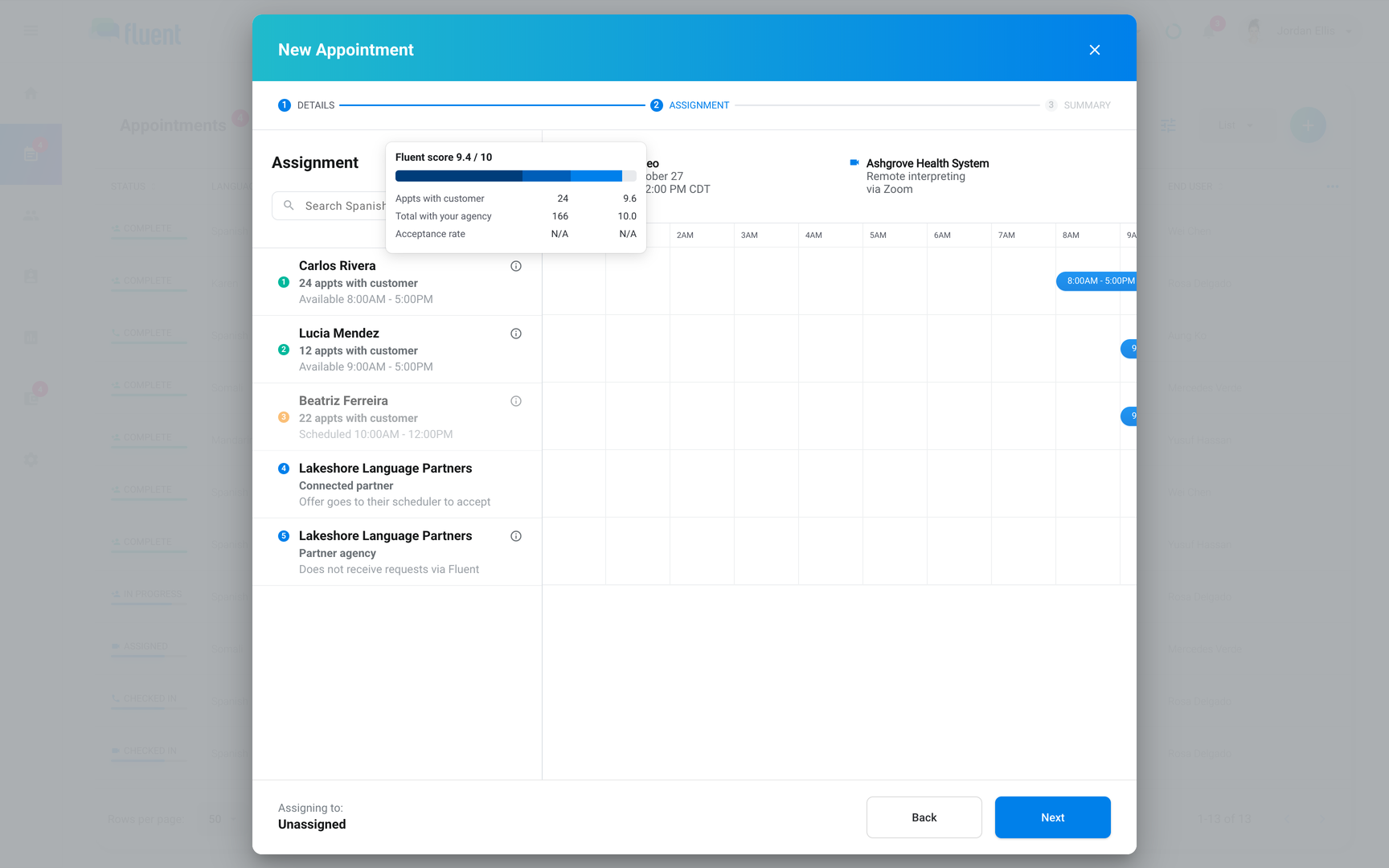
To see why a row sits where it does, hover the info icon on it. The tooltip shows the score, such as "Fluent score 7.4 / 10", and a row per factor with the number Fluent counted and its score out of 10.
- Acceptance rate shows "N/A": The interpreter has fewer than 10 offers they accepted, declined, or let expire in the last 12 months. N/A doesn't count as 0.
- Adjustment rows: Last appointment, New interpreter, and Availability show when they change the score. See Adjustments to the score.
- Proximity shows "Address not set": The profile has no Address Fluent can place on a map.
How the score is calculated
Each factor gets a score from 0 to 10 and counts toward the total by its weight. An appointment counts once its voucher is complete, which is when it shows Complete.
| Factor in the tooltip | What Fluent counts | Full score at | In-person weight | Video and Phone weight |
|---|---|---|---|---|
| Appts with customer | Your agency's Complete appointments for this customer | 25 | 40% | 55% |
| Total with your agency | Your agency's Complete appointments, any customer | 100 | 15% | 20% |
| Acceptance rate | Share of offers accepted, last 12 months | Every offer accepted | 20% | 25% |
| Proximity | Straight-line miles from the profile Address | 5 miles or less | 25% | Not used |
- Acceptance rate: Offers the interpreter accepted, declined, or let expire count. An offer another interpreter accepted first, a reassignment, a cancel, or an offer still waiting for an answer doesn't. With fewer than 10, Fluent uses the combined rate of the candidates in this list who have 10 or more, or 85% when none do.
- Proximity: The score is 10 up to 5 miles, then falls with distance to 0.5 from 75 miles on. No Address scores 0.5. The row and the tooltip show driving miles when Fluent can route them, so they can read higher than the straight-line miles the score uses.
Adjustments to the score
After the factors, Fluent applies 3 fixed adjustments. Each one that changes the score has its own row in the tooltip.
Older history counts for less
Fluent scales Appts with customer and Total with your agency by how long ago the interpreter's last Complete appointment with your agency was. Acceptance rate and Proximity aren't scaled. The tooltip's Last appointment row shows the scale, such as × 0.85.
| Last Complete appointment with your agency | History counts at |
|---|---|
| Up to 6 months ago | 100% |
| 6 to 12 months ago | 85% |
| 12 to 24 months ago | 60% |
| More than 24 months ago | 35% |
New interpreters get a boost
An interpreter in their first 90 days gets up to 1.5 extra points, and their row shows a New badge. The tooltip's New interpreter row shows the points, such as +1.5.
- Start: The Date Hired on their profile, or the day they joined your interpreter team when Date Hired is empty.
- Size: It shrinks with each Complete appointment at your agency and is gone at 25.
- End: It ends after day 90, however many appointments they've done.
Interpreters who can't make the time get half
Fluent halves the score of an interpreter who can't make the appointment's time, dims their row, and shows Availability × 0.5 in the tooltip. You can still pick them. That happens when:
- Another appointment: One of theirs overlaps this one. Eligibility and booking conflicts says which appointments count.
- Time off: Their time off overlaps it.
- Weekly hours: Their hours that day don't cover the whole appointment. An interpreter with no hours set that day keeps their full score.
Partner agencies
In Assign, each partner agency gets a score of its own. Fluent counts it from your agency's Complete appointments that went to the partner's interpreters.
| Factor | Full score at | Weight |
|---|---|---|
| Appts with customer | 20 | 50% |
| Appointments in this language | 50 | 30% |
| Total with your agency | 100 | 20% |
- Top score: Fluent applies the same recency scale, then keeps 55% of the result, so a partner agency scores 5.5 at most.
- Not used: Distance, availability, and the boost don't apply.
- Tooltip: The Partner agency row shows the 55%, as × 0.55.
Rules and limits
- The weights, caps, and adjustments are the same for every agency, and you can't change them.
- Certifications, specializations, tags, and margin don't change the score.
Troubleshooting
A new interpreter has no New badge
Their Date Hired, or the day they joined your interpreter team when Date Hired is empty, is more than 90 days ago, or they have 25 Complete appointments with your agency. To correct Date Hired, see Interpreter profiles.