
Invoice review flags
Every flag the invoice review can raise, what raised it, how to clear it, and which flags you can approve as billed.
What you'll learn
- What each flag on an invoice means, and how to clear it or approve it as billed before you approve the invoice.
How flags work
Each flag sits on the appointment it questions, in the invoice review you open from Billing › Review. Owners and Admins see and answer flags.
Important: Until you answer a red or amber flag, it holds that appointment's lines out of an approval. The steps for answering flags are in Review and approve invoices.
The color says what the flag needs:
- Red: Fluent can't bill the line as it stands, or the value looks wrong. Most red flags clear only when you fix the source.
- Amber: Fluent needs your decision. Fix the source or approve the value as billed.
- Blue: The flag gives context and never holds a line.
How answers and counts show:
- A flag you approve as billed: It turns blue and reads, for example, "Duration discrepancy · approved". The approval covers the values you saw.
- A later change: If a later change moves the values you approved, the flag asks again.
- The invoice review footer: Counts open flags as "N blocking" for flags you can only fix at the source, and "N flags" for the ones you can approve as billed. Blue flags aren't counted.
- The invoice's status: An invoice with open flags reads N need attention, and one with a rate gap reads Missing rates. See Invoice and run statuses.
Voucher and time flags
These flags compare the interpreter's voucher with the appointment's scheduled time.
| Flag | Color | Raised when | Fix | Approve as billed |
|---|---|---|---|---|
| No voucher submitted | Red | No voucher, billed from the scheduled time | Add voucher or Send reminder | Yes, Approve as scheduled |
| Voucher not completed | Red | Voucher started but not completed | Add voucher or Send reminder | Yes, Approve as scheduled |
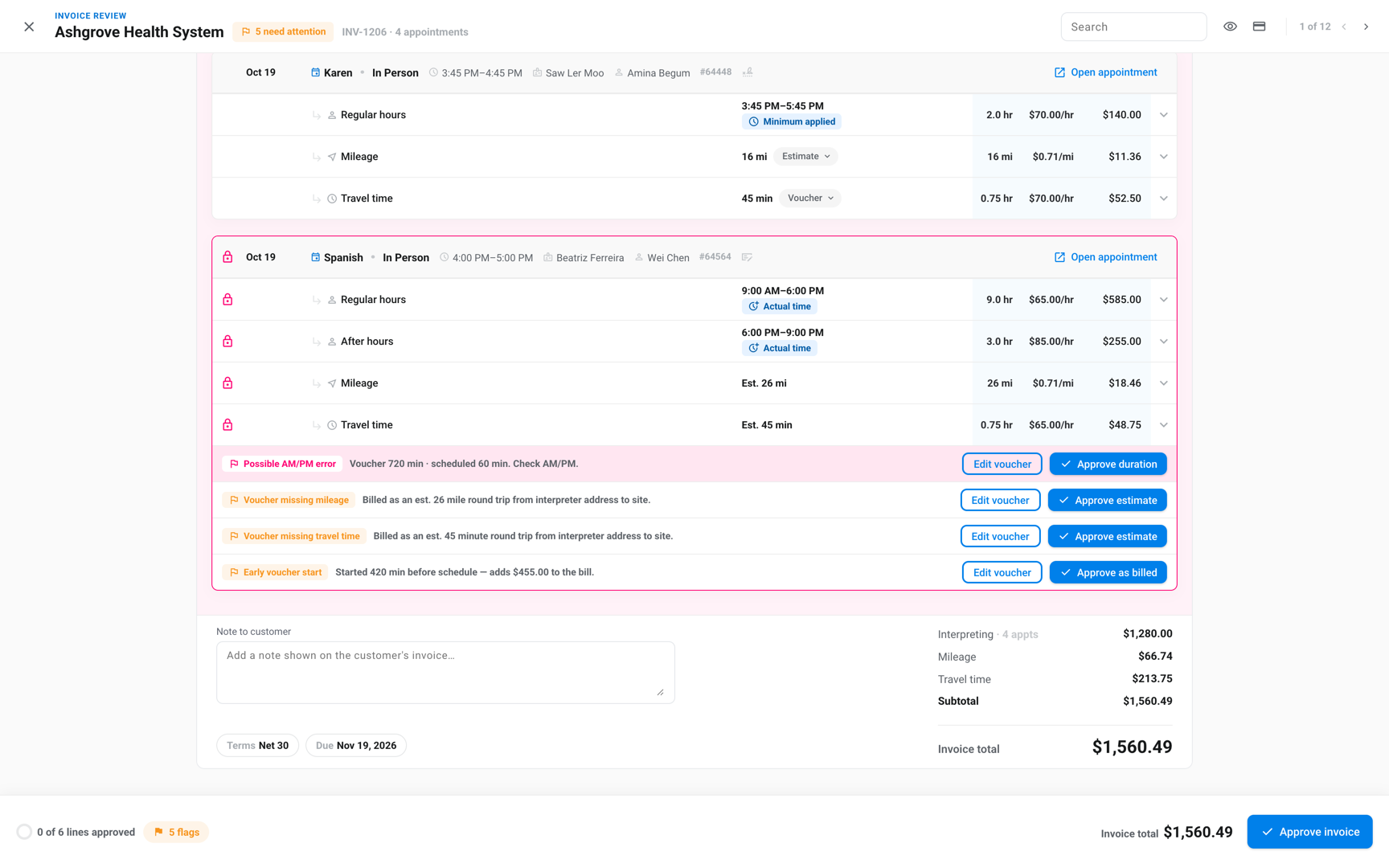
| Duration discrepancy | Amber | Voucher and schedule differ by Voucher duration | Edit voucher | Yes, Approve duration |
| Possible AM/PM error | Red | Voucher runs past the Duration escalation | Edit voucher | Yes, Approve duration |
| Early voucher start | Amber | Voucher starts early and changes the bill | Edit voucher | Yes, Approve as billed |
- Possible AM/PM error: A Duration discrepancy becomes Possible AM/PM error when the voucher runs longer than the scheduled time by more than the Duration escalation. The message ends "Check AM/PM."
- Minimum longer than the schedule: Fluent measures the AM/PM check from the Minimum.
- Duration discrepancy in blue: It shows in blue, with no approve button, when the voucher is shorter than scheduled or both fit inside the Minimum.
- Early voucher start in blue: It shows in blue when the early minutes leave the bill unchanged.
- No voucher submitted on several appointments: When it's on 2 or more appointments of one invoice, Approve scheduled-time billing on all N appointments approves them together.
Mileage and travel flags
These flags check mileage and travel time on In-person appointments whose customer rate card bills them. Fluent compares the voucher with the round trip it calculates from the interpreter's address to the appointment.
| Flag | Color | Raised when | Fix | Approve as billed |
|---|---|---|---|---|
| Mileage discrepancy | Amber | Voucher and estimated miles differ by over Mileage | Edit voucher | Yes, Approve mileage |
| Implausible mileage | Red | Voucher miles look like a typo | Edit voucher | No |
| Travel time discrepancy | Amber | Voucher and estimate differ by over Travel time | Edit voucher | Yes, Approve as billed |
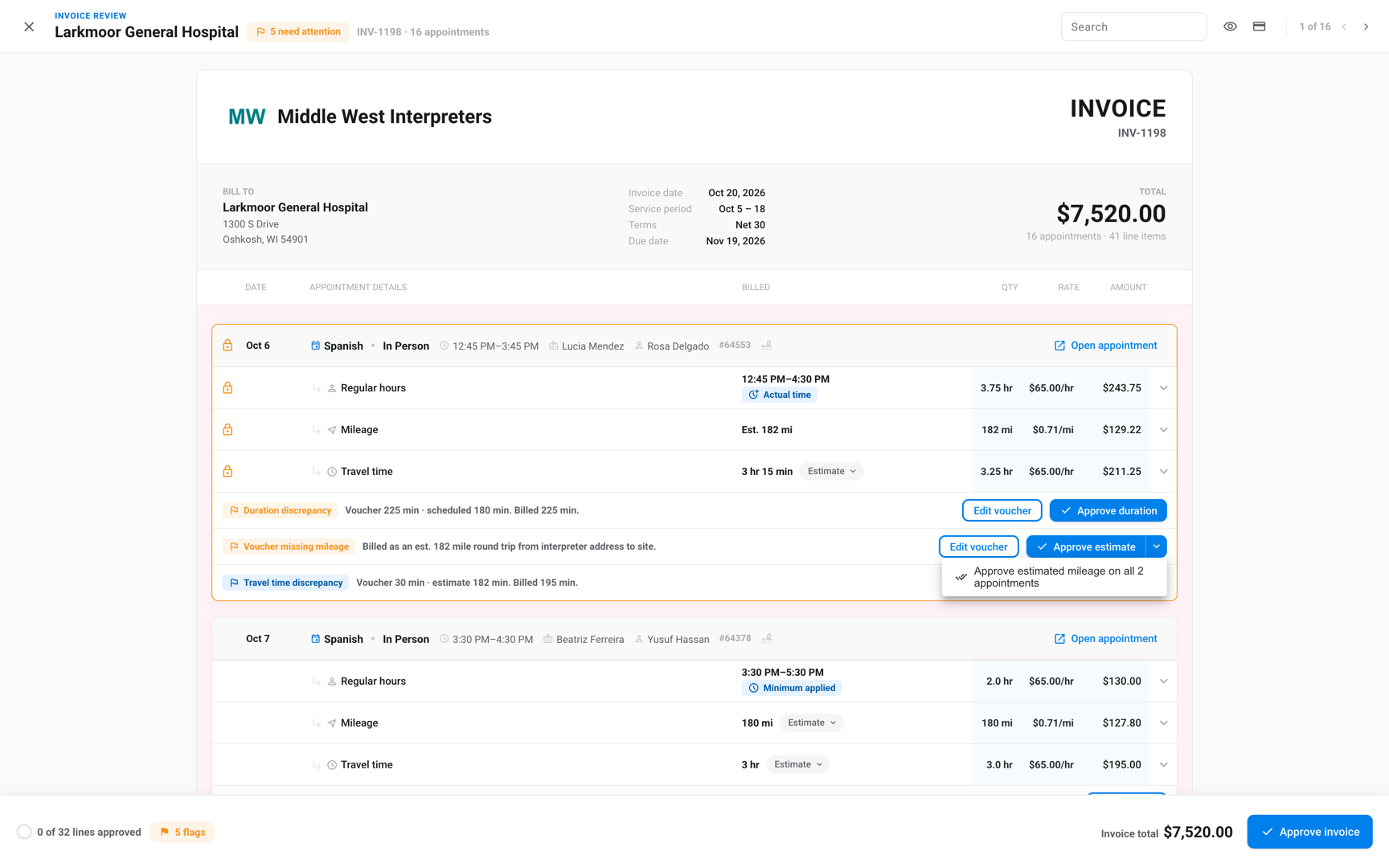
| Voucher missing mileage | Amber | No miles on the voucher, estimate billed | Edit voucher | Yes, Approve estimate |
| Voucher missing travel time | Amber | No travel time on the voucher, estimate billed | Edit voucher | Yes, Approve estimate |
| Missing mileage | Red | No miles and no estimate, $0.00 billed | Edit voucher | No |
| Missing travel time | Red | No travel time and no estimate, $0.00 billed | Edit voucher | No |
| No interpreter address | Red | No address to estimate from, $0.00 billed | Add interpreter address or Edit voucher | No |
| Address not locatable | Red | The interpreter's address can't be mapped | Fix interpreter address or Edit voucher | No |
| Travel billed on late cancel | Red | Voucher travel billed on a Late Cancel | Edit voucher | Yes, Approve as billed |
- Discrepancies in blue: Mileage discrepancy and Travel time discrepancy show in blue, with no approve button, when the voucher is under the estimate. Fluent bills the greater of the two, so the bill doesn't change.
- Implausible mileage: Fluent marks mileage implausible when the voucher has 300 miles or more, or at least 3 times the estimate and at least 100 miles more than it.
- Missing mileage or travel time on several appointments: When Voucher missing mileage is on 2 or more appointments of one invoice, the Approve estimate menu offers Approve estimated mileage on all N appointments. Voucher missing travel time offers Approve estimated travel time on all N appointments the same way.
Rate and margin flags
These flags question the price, not the voucher. When no rate card can price an appointment, the invoice shows Missing rates and the appointment names the gap. See Fix Missing rates.
| Flag | Color | Raised when | Fix | Approve as billed |
|---|---|---|---|---|
| Zero rate | Amber | A line billed at $0.00 | Fix rate | No |
| Rates changed since generated | Red | Current rates or vouchers price it differently | Fluent re-prices the draft | No |
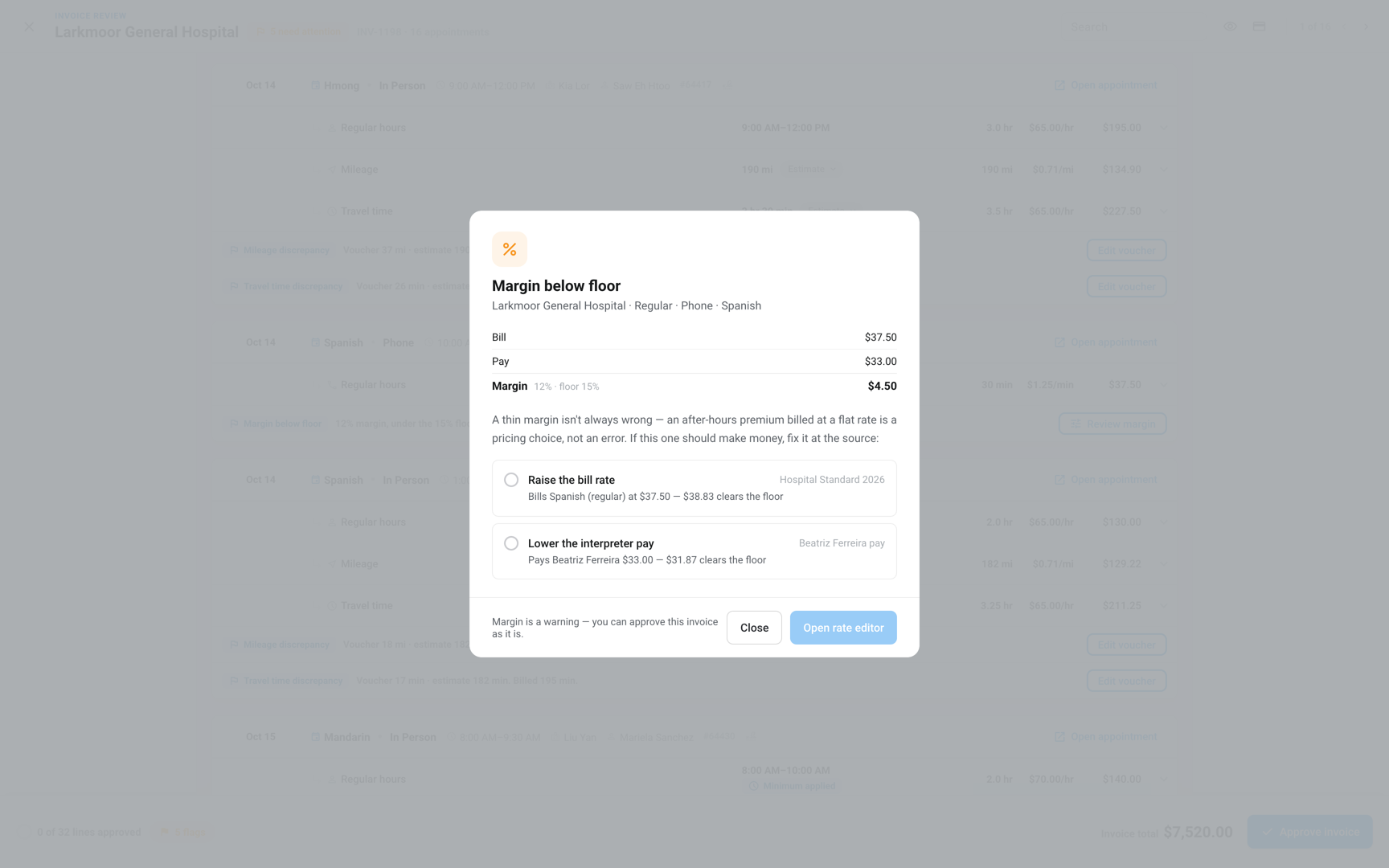
| Margin below floor | Blue | Margin under the Margin floor | Review margin | Not needed |
- Zero rate: It also gives the invoice the Missing rates status.
- Margin below floor: It compares what an appointment bills with what it pays the interpreter. It appears only when the pay is more than $0.00.
- Review margin: It shows both numbers and opens a rate editor to raise the bill rate or lower the pay. When the pay is more than the bill, the dialog says "Losing money".
Visit flags
Fluent bills same-day appointments for one customer, address, and interpreter as one visit when they fall inside the customer's Merge gap. Visit flags tell you when that happened, or when it nearly did.
| Flag | Color | Raised when | Fix | Approve as billed |
|---|---|---|---|---|
| Merged into one visit | Blue | Appointments billed as one visit | Review visits to split them | Not needed |
| Overlap at two addresses | Amber | One interpreter, back to back, two addresses | Review visits to merge or keep them | Yes, Approve as billed |
| Split by decision | Blue | A reviewer split a merged visit | Review visits to merge again | Not needed |
| Missing vouchers · N of M | Red | Appointments in the visit have no voucher | The buttons on each appointment's row | Yes, per appointment |
- A visit's charges: A visit has one Minimum and one set of travel charges.
- Merged into one visit: It comes from the customer's Merge gap, or from a reviewer who clicked Merge into one visit. Lines in a merged visit carry a blue Merged badge.
- Overlap at two addresses: It looks for In-person appointments with one interpreter, inside the Merge gap and in one zip code, whose addresses don't match. See Billing rules for the Merge gap.
After the run closes
Closing a run makes its invoices final, so you can't approve their flags after that. A voucher or rate change after that shows as a difference to answer instead:
- Prices differently since close: The invoice now prices differently from what it billed, and you pick how to correct it.
- Rate change, Voucher changed, or Rate change · voucher changed: Marks each line the change moved, with the old and new figures.
The answers and what each one sends are in Correct a closed invoice.
Review thresholds
Your agency's invoice review thresholds decide how big a difference must be before the duration, AM/PM, mileage, travel time, and margin flags appear. They apply to every invoice run in your agency.
The defaults, the allowed values, and what a save re-checks are in Agency defaults and holidays.
Rules and limits
- No button takes back an approval as billed, and Undo approvals keeps the flags you approved.
- Approving a duration, mileage, travel time, missing voucher, overlap, or late-cancel travel flag approves it on the pay run too, when the values match. Early voucher start is approved on each side separately. See Pay review flags.
- Work a partner agency did has no drive estimate and no Send reminder. A missing mileage or travel time figure holds its line until you enter the voucher.
- Rush pricing shows as an amber Rush badge on the line, not as a flag.
Troubleshooting
Rates changed since generated doesn't clear
Fluent re-prices a draft by itself when its rates or vouchers change. This flag stays only when that re-pricing failed, and it can't be approved.
Contact support with the invoice number.