
Customer page
What each tab of a customer's page is for, how the Activity card counts appointments, hours, and invoices, and who sees each part.
What you'll learn
- What each part of a customer's page tells you, and how its activity numbers are counted.
What the customer page is
The customer page is where you look up everything about one customer before you book, price, or bill its work. Open it by clicking the customer in Customers.
- Who can open it: everyone at your agency except interpreters.
- The header: names the customer, shows whether it's Active or Deactivated, and gives its number under Account, such as ACT-1042.
- "One per appointment" under Invoicing: shows in the header when the customer gets a separate invoice for each appointment. You set that on the Invoice grouping exceptions card in Settings › Billing runs. See Set up billing runs.
The tabs
Each tab does one job, and the article linked from it covers the task.
- Overview: See how much work you do for the customer, and keep its details, addresses, and sites. See Managing customers and Customer sites.
- Rates: See the rate card Fluent bills this customer from, and change its prices. See Customer rate cards.
- Invoices: See this customer's invoices. See How invoicing works.
- Form fields: Choose which appointment details print on this customer's invoice lines. See Form fields.
You change the details, the rate card, and the Form fields with Edit on their tab, and sites in the Sites card. Each tab has its own web address, so you can bookmark or share it.
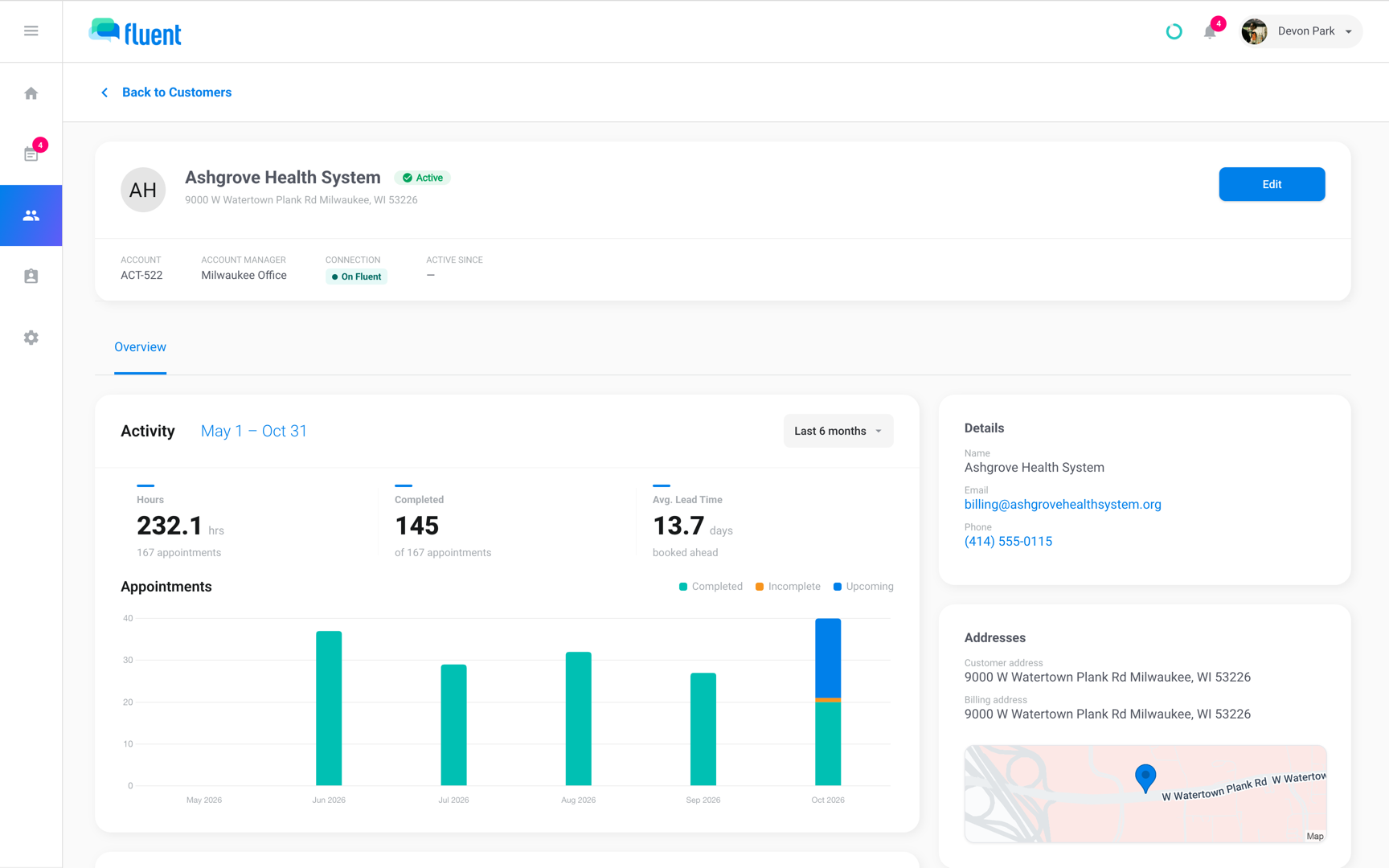
How the Activity card counts
The Activity card on Overview shows how much work this customer gives you and what it bills, over the last 6 months or a range you pick. Pick a range in the menu at the top of the card: Last 3 months, Last 6 months, Last 12 months, This year, or Last year.
- Whole calendar months: each range includes the current month. In October, Last 3 months covers August 1 to October 31, so this month's upcoming appointments count too.
- Each appointment: counts in the month it starts.
The card sorts appointments by outcome:
- Completed: The appointment has a completed voucher.
- Incomplete: The appointment was assigned, has ended, and has no completed voucher.
- Upcoming: The appointment is assigned and hasn't started.
Canceled and missed appointments are counted separately. Hours add up the voucher times of completed appointments only.
Which tiles you see above the chart depends on your role:
- Invoiced: The total of this customer's invoices whose period overlaps the range, drafts included. When some are drafts, the line under it says how much is still in drafts.
- Effective Rate: The invoiced total divided by the service hours on those invoices.
- Outstanding: The open balance QuickBooks holds for those invoices, with the next due date. It appears once at least 1 of them is synced to QuickBooks.
- Completed and Avg. Lead Time: How many appointments were completed, and how many days ahead assigned appointments were booked on average.
The card below the Activity card shows the share of appointments by language, by service type, and by outcome. Every dialect counts under its language.
Who can see each part
Everyone who opens the page sees Overview and its appointment counts. The money depends on your role.
| Part of the page | Owner | Admin | Manager | Scheduler |
|---|---|---|---|---|
| Overview tab | Yes | Yes | Yes | Yes |
| Hours tile and the appointments chart | Yes | Yes | Yes | Yes |
| Invoiced line on the appointments chart | Yes | Yes | No | No |
| Invoiced, Effective Rate, and Outstanding tiles | Yes | Yes | No | No |
| Completed and Avg. Lead Time tiles | No | No | Yes | Yes |
| Rates, Invoices, and Form fields tabs | Yes | Yes | No | No |
Organization team members don't see Customers either. See Agency roles and permissions.
Rules and limits
- A deactivated customer's page is read only and has no Edit button. To change it, reactivate the customer first, as Managing customers shows.
- Saving a change to a rate card other customers share asks whether to move this customer to its own card or update it for everyone. See Customer rate cards.
Troubleshooting
"Activity could not be loaded."
Fluent couldn't fetch the customer's activity. Click Retry on the card.
Hours look low next to the appointment count
Hours count only appointments with a completed voucher. Appointments that are upcoming, incomplete, canceled, or missed add no hours.
I don't see the Outstanding tile
Only Owners and Admins see it, and only once at least 1 of this customer's invoices in the range is synced to QuickBooks. Sync them, or pick a wider range. See Sync invoices to QuickBooks.
I don't see the Rates tab
Your role doesn't include the billing tabs, as Who can see each part shows. Ask someone whose role does.