
Troubleshoot notifications
Fixes for missing emails and pushes, a badge that won't clear, notifications you can't open, and a same-day confirmation that didn't arrive.
What you'll learn
- How to fix notifications that don't arrive, won't clear, or won't open.
Fluent has no notification settings, and its emails have no unsubscribe link. To get fewer, filter on the sender address in your mail app.
- Sender addresses: no-reply@fluentworks.com, and scheduler@fluentworks.com for offer and scheduling emails.
- Subject line: an email about one appointment carries its appointment number.
I'm not getting Fluent emails
Fluent skips every email to a deactivated account. Mail apps file unknown senders in spam.
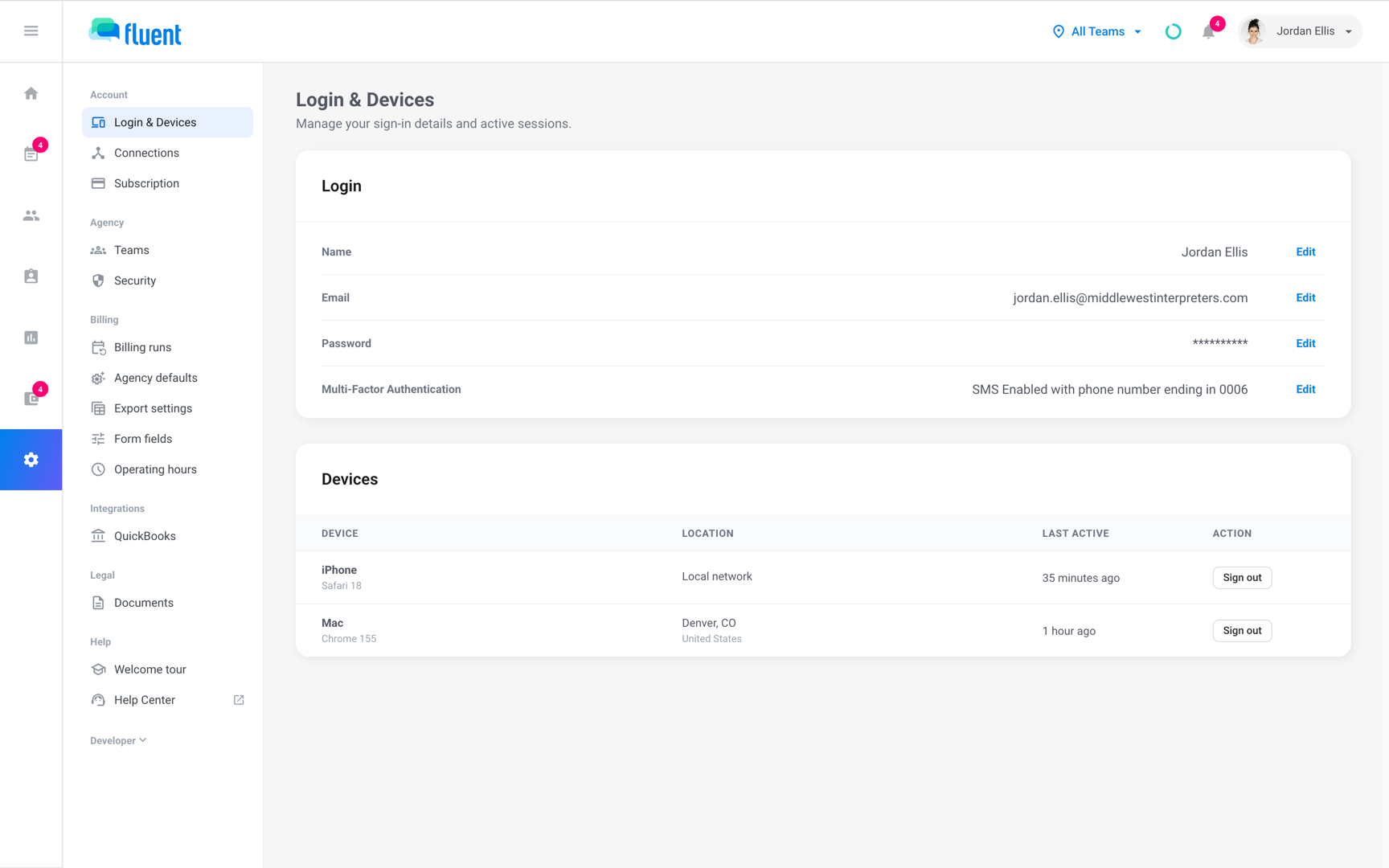
- Go to Settings › Login & Devices and check the email under Login.
- Search your mail, spam included, for the 2 sender addresses, and add both to your contacts.
- Ask your agency whether your account is still active.
A colleague didn't get the email
Agency staff get an appointment's emails only when they belong to the appointment's team.
- Appointment emails: check their teams in Team Permissions. See Teams.
- Auto-assign and Broadcast progress emails: these go to the agency's Scheduling Contacts address, not to each person.
Push
A push reaches a phone once the mobile app has signed in there, until someone taps Sign Out in the app's side menu. The phone also has to allow notifications for Fluent.
I'm not getting push notifications
The app was signed out with Sign Out or never signed in on that phone, the phone blocks notifications for Fluent, or the notice is one Fluent never pushes.
- Open the mobile app and sign in.
- In your phone's settings, allow notifications for Fluent. The app asks once, the first time.
- In the web app, go to Settings › Login & Devices and check that the phone is listed under Devices.
- Agency staff: most notices never push. Comments do.
- Organization accounts: get no push, because the mobile app is for agency teams and interpreters.
I stopped getting offer pushes
The mobile app signs you out on its own after 5 minutes without activity, after more than 5 minutes in the background, and each time you reopen it. The phone keeps getting pushes through those sign-outs. Under Devices on Settings › Login & Devices, it reads "Signed out, still gets offer notifications".
Pushes stop on a phone when:
- You tap Sign Out: in the app's side menu.
- Your password changes: a reset, or a change made on another device, stops pushes on every other phone.
- Someone else signs in: the phone's pushes move to the person who signed in last.
- You sign out the phone on the web: with Sign out on its row under Devices.
Sign in on the phone again, and pushes resume. See Sign in to the mobile app.
Bell and Notifications tab
Where you find your notices depends on the app.
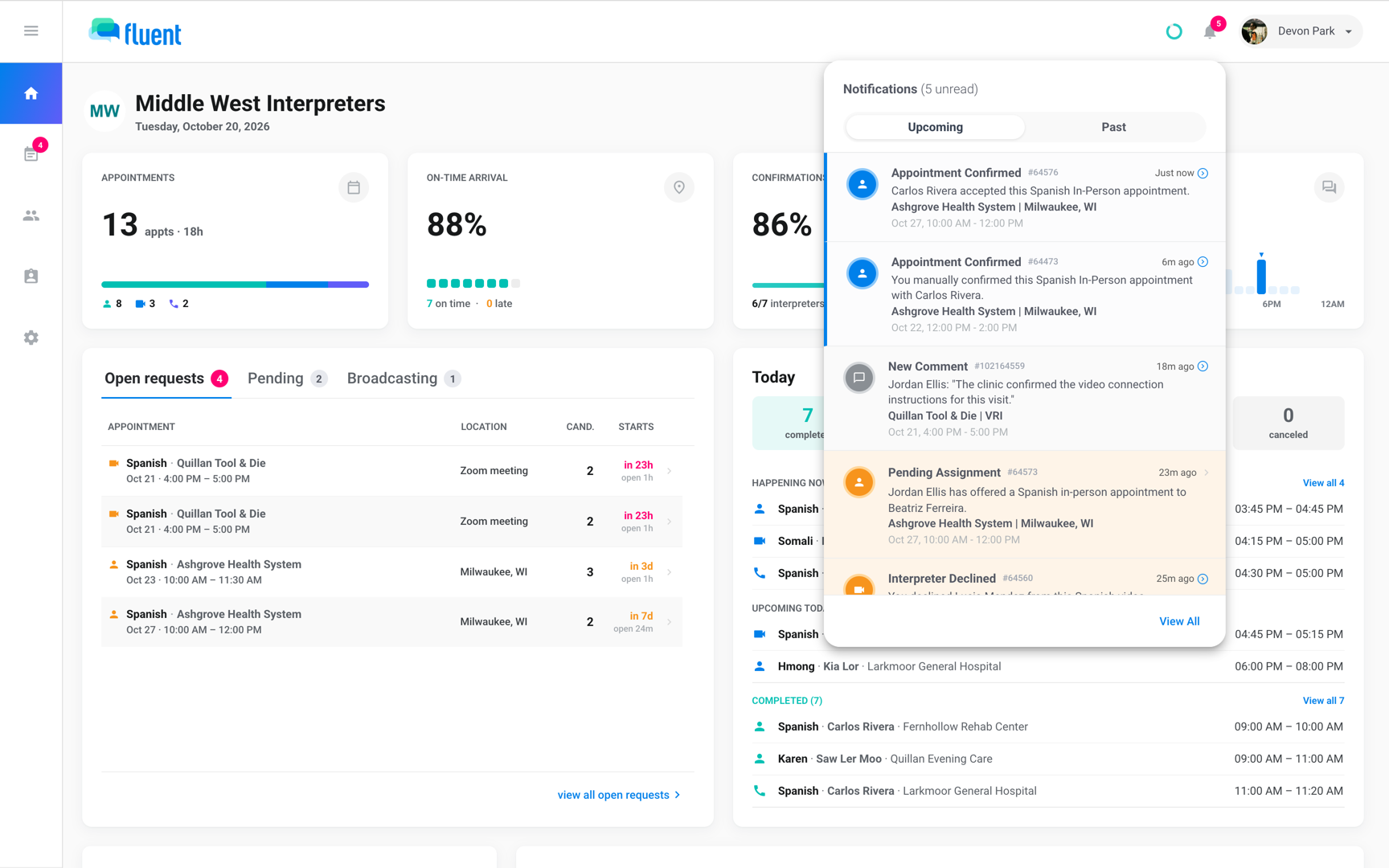
- Web app: the bell opens the Notifications panel with the tabs Upcoming and Past. View All opens the Notifications page, where Appointment # finds every notice about one appointment.
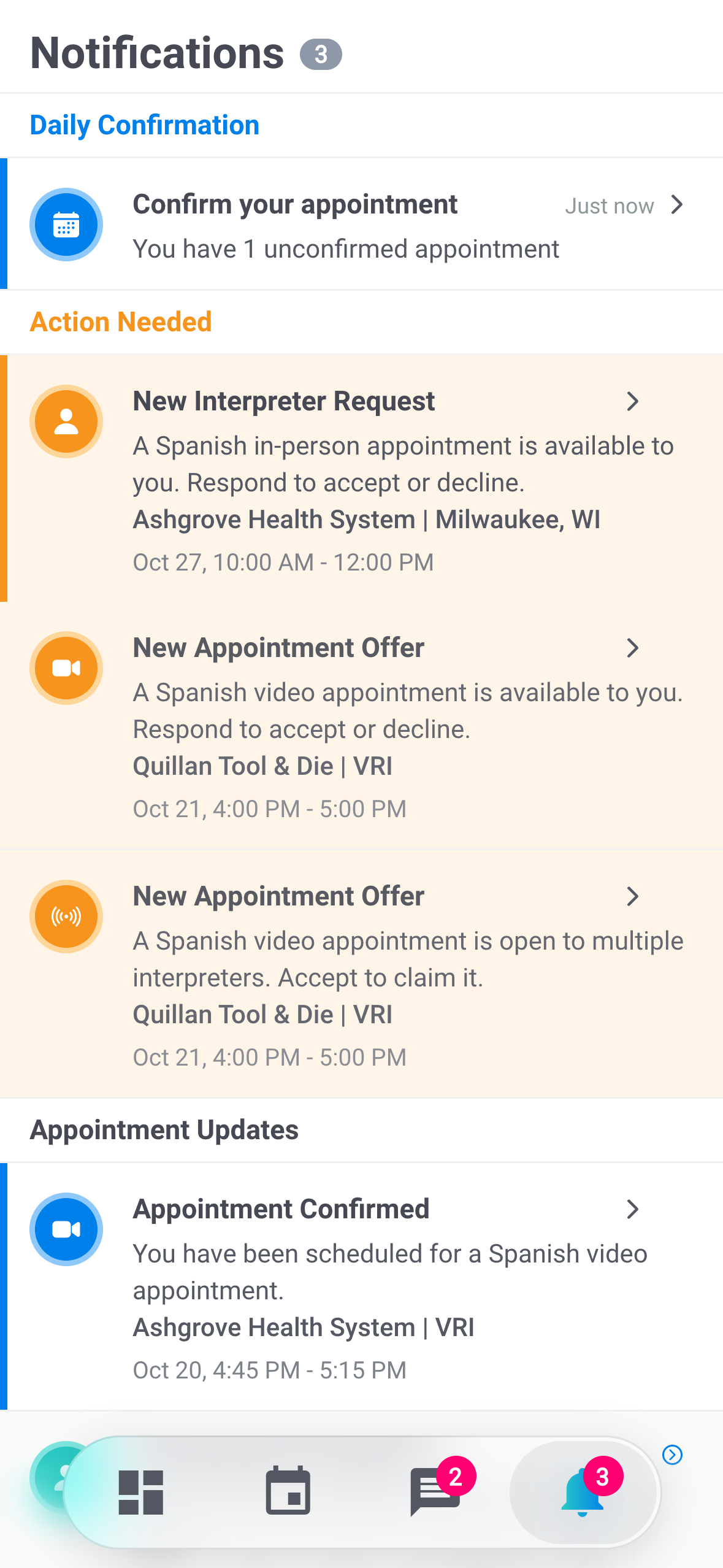
- Mobile app: the Notifications screen groups your notices under Daily Confirmation, Action Needed, and Appointment Updates.
The badge shows unread but I don't see anything new
The bell marks a tab read only when you close it or switch tabs. An unread row can wait on the tab you didn't open.
- Upcoming: rows whose appointment is today or later, in the appointment's time zone.
- Past: older rows, and every completed-appointment notice.
Click Past. Its dot means it holds unread rows.
I can't open a notification
You're no longer on that appointment, so Fluent hides its details. The message is one of these:
- "You declined this appointment. Details are no longer available."
- "This appointment is not assigned to you, so details are no longer visible."
- "This appointment offer is no longer available."
If you think you should still be on it, ask your agency.
"Could not refresh notifications. Check your connection and try again."
The mobile app couldn't reach Fluent. Check the phone's connection, then pull down on the Notifications screen to refresh.
Same-day confirmations
The same-day confirmation goes out on a schedule, to the interpreters who qualify at that moment.
My interpreter didn't get the same-day confirmation
The Daily Appointment Summary email and the "Confirm Today's Appointments" push go out in the morning. They reach only an active interpreter with at least 1 Assigned appointment that day.
- Pending offer: doesn't count.
- Web bell: never shows the request.
Check that the appointment shows Assigned and the interpreter is active, then confirm with them directly. See Same-day confirmations.
If none of these match
Contact support and include:
- The email you sign in with
- The workspace name
- The appointment number, and whether you expected an email, a push, or a bell notification
- When you expected it, and the exact message you see, in quotes