
Invoice and run statuses
Every status chip and second line on invoices, invoice runs, and pay runs in Billing, what each one means, and what to do next.
What you'll learn
- What each status on an invoice or run means, and what to do next when one needs something from you.
Invoice statuses
Each invoice shows one chip in Billing › Review, Billing › Invoices, Billing › Payments, and a customer page's Invoices tab. The first 3 mean the invoice needs something from you, and the last 3 say where it stands.
| Status | Color | What it means | What you can do |
|---|---|---|---|
| Missing rates | Red | No rate card prices some of its work | Fix the rate card |
| N need attention | Amber | N flags wait for your decision | Fix each flag, or approve it as billed |
| Draft | Grey | No open flags, not approved | Approve invoice |
| Approved | Green | Approved, and its period is still open | Undo approvals until the run closes |
| Closed | Green | Its run closed, and the invoice is final | Export, sync, revise, or mark as paid |
| Paid | Green | Marked paid, or paid in full in QuickBooks | Undo mark as paid, if you marked it and QuickBooks doesn't show it paid |
- Paid: wins over every other chip.
- Closed: wins over open flags, so a closed invoice never reads Missing rates or N need attention.
- Missing rates: see Fix Missing rates.
- N need attention: for what each flag means, see Invoice review flags.
The second line
The line under the chip says what has happened to the invoice, or what still waits on you. An amber line asks for an answer, and a grey line is a record.
| Second line | Color | What it means |
|---|---|---|
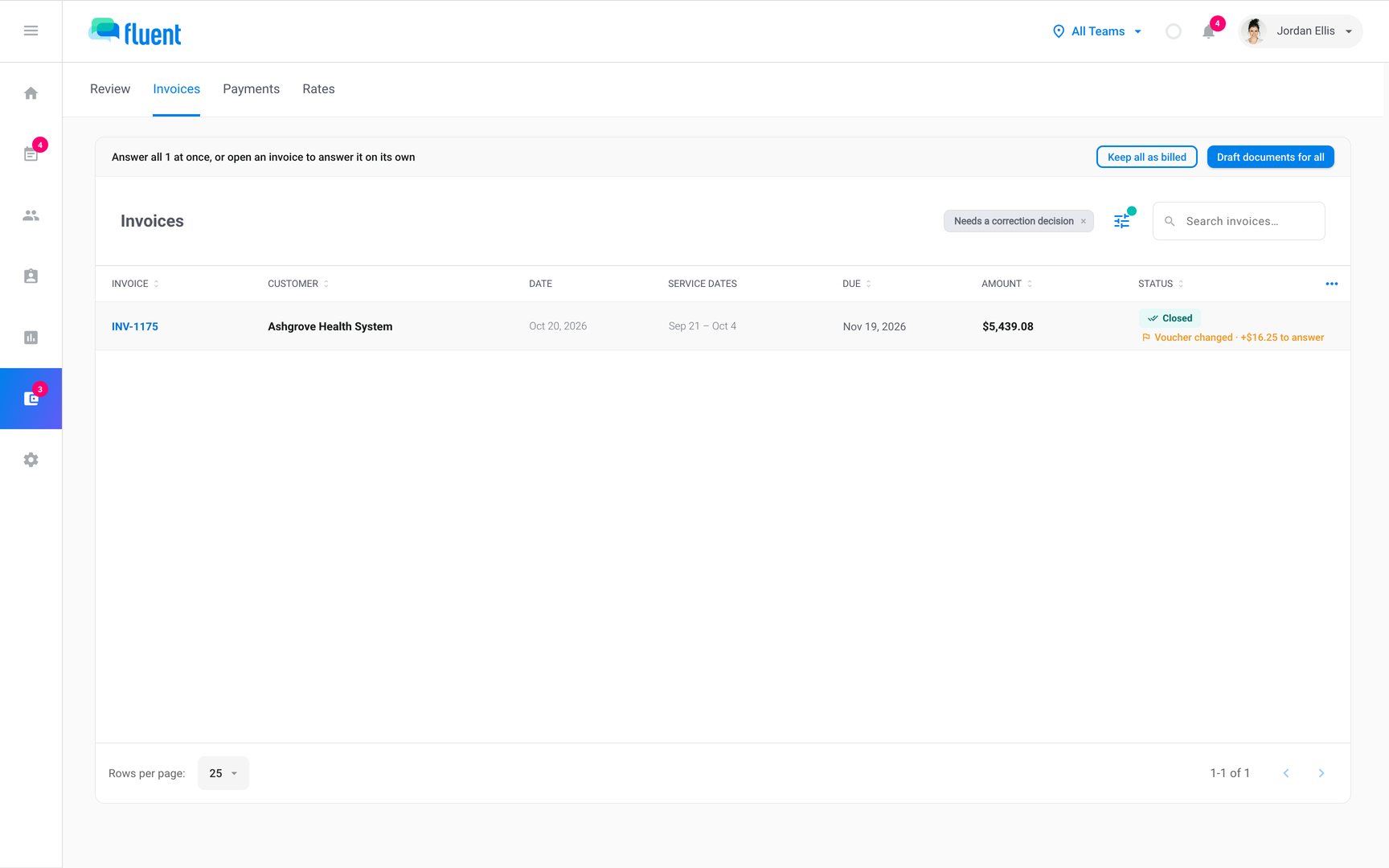
| "Voucher changed · +$X to answer" | Amber | A voucher edit changed what this closed invoice bills |
| "Rate change · +$X to answer" | Amber | A rate correction re-priced work on it |
| "Rate change · voucher changed · +$X to answer" | Amber | Both changed since the close |
| "Sync failed · <reason>" | Amber | QuickBooks refused the last sync, for this reason |
| "Revised <date> · rev N · not exported yet" | Amber | An older revision left Fluent, this one hasn't |
| "Every line approved" | Amber | Click Approve invoice to finish |
| "N more need attention" | Amber | Under Missing rates, N flags are also open |
| "N of M lines approved" | Grey | Some lines are approved, the rest aren't |
| "Exported <date>" | Grey | The day of the first PDF, CSV, or Excel file |
| "In QuickBooks" | Grey | QuickBooks holds the invoice |
| "Revised <date> · rev N" | Grey | The latest revision, from revision 2 on |
| "Corrects INV-x" | Grey | This invoice bills a difference on INV-x |
| "Credit memo · corrects INV-x" | Grey | This credit memo returns a difference on INV-x |
| "Corrected on INV-y" | Grey | A later document corrects this invoice |
- A difference to answer: open the invoice and click Revise, New document, or Keep as billed. See Correct a closed invoice.
- "to answer" or "Sync failed": replaces the rest of the second line until you deal with it.
The QuickBooks column
While QuickBooks is connected, invoice tables add a QuickBooks column. Billing › Review and Billing › Invoices word it differently.
| Billing › Review | Billing › Invoices | What it means |
|---|---|---|
| Not synced | Not synced | QuickBooks doesn't hold it |
| Synced | Synced | In QuickBooks, payment status still loading |
| Needs update | Needs update | QuickBooks holds an older revision |
| Synced · open | Open | In QuickBooks, unpaid |
| Synced · partial | Partial | In QuickBooks, partly paid |
| Synced · paid | Paid | In QuickBooks, paid in full |
| In an earlier company | In an earlier company | Synced to a QuickBooks company you've since replaced. Fluent no longer updates it or reads its payments |
- Needs update: shows even when QuickBooks has a payment on the older copy.
- Partial: a partial payment doesn't change the Status chip.
- In an earlier company: when your customer pays, mark the invoice paid in Fluent. See Track invoice payments.
- To sync, or to retry after Sync failed: see Sync invoices to QuickBooks.
Run statuses
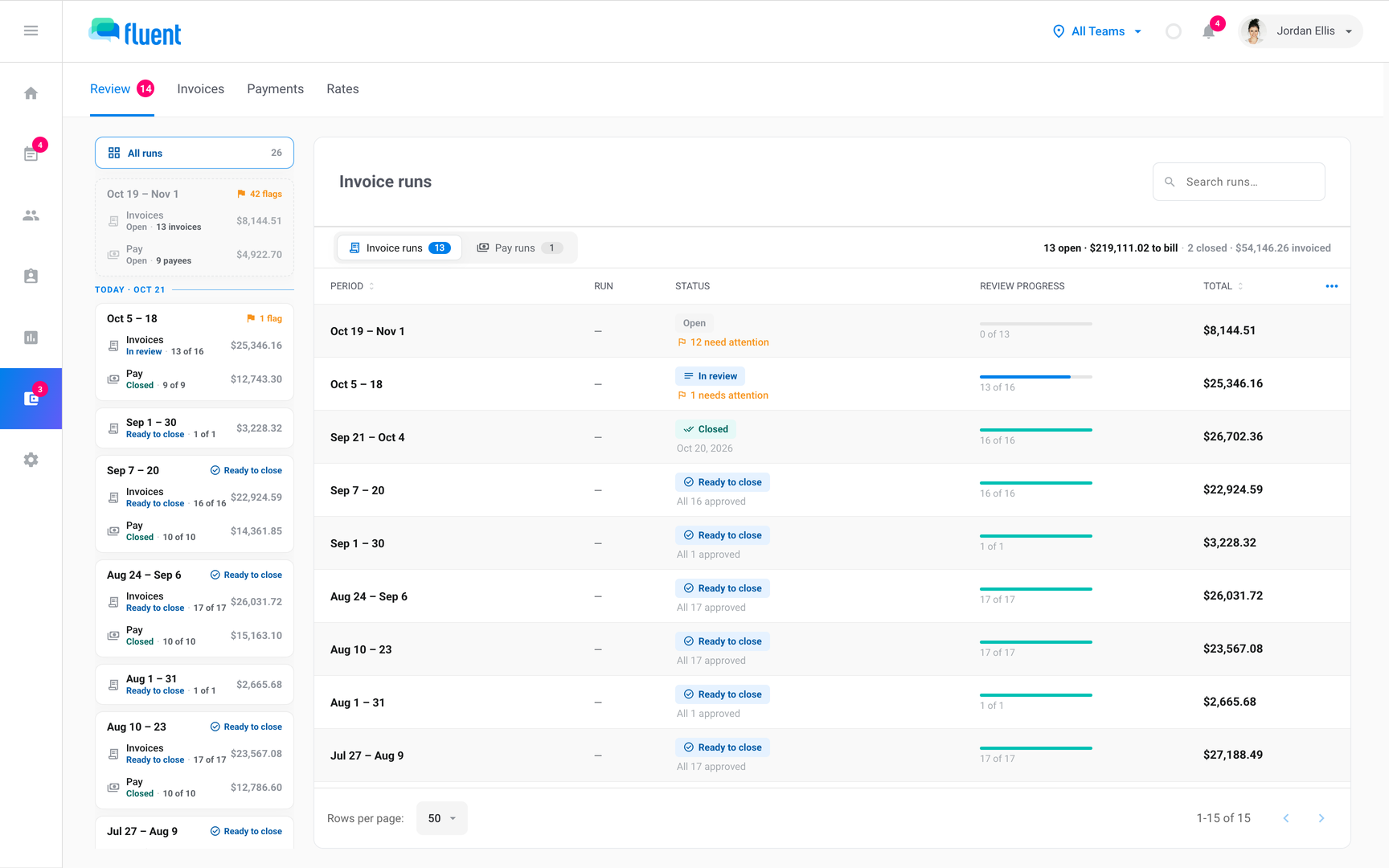
A run holds one period's invoices, or one period's pay. Invoice runs and pay runs use the same chips in the rail, the run header, and All runs in Billing › Review.
| Status | Color | What it means | What you can do |
|---|---|---|---|
| Open | Grey | The period hasn't ended | Review and approve as work completes |
| In review | Blue | Period ended, approvals still to do | Approve the rest |
| Ready to close | Blue | Period ended, everything approved | Close run or Close pay run |
| Closed | Green | The run is closed | Export or sync, or send pay to payout |
| Nothing to pay | Grey | Pay runs only, every appointment pays $0 | None. There's nothing to close |
The line next to a run's status says what's left:
| Line | Where | What it means |
|---|---|---|
| "N need attention" | All runs, run header | Open flags across the run |
| "N invoices can't be priced" | All runs, run header | No open flags, but some Missing rates |
| "held N days" | Run header | Ready to close, N days since it generated |
| "Invoices on <date> · N days" | Run header, Open runs | The day Fluent generates the run |
| "Upcoming" | Rail | The open period, on a card with both runs |
On a pay run, "invoices" reads "payees", and an Open run's line reads "Pay statements on <date>". To close a run, see Close an invoice run.
Pay run statuses in Billing › Payments
After a pay run closes, you finish it in Billing › Payments. There, its chip changes as you send it to payout and mark it paid.
| Status | Color | What it means | What you can do |
|---|---|---|---|
| In review | Blue | Not closed | Close it in Billing › Review |
| Closed | Green | Closed, not sent to payout | Send to payout |
| Processing | Blue | Sent to payout, not marked paid | Mark paid |
| Paid | Green | Marked paid, and its pay can't change | None |
- Closed, Processing, and Paid runs: show "Pay day <date>" on the second line. See Send to payout and mark paid.
- A run with a difference to answer: shows an amber line, such as "Voucher changed · +$X to answer", in place of Pay day.
- Payee rows in the pay review: have chips of their own. See Review and close a pay run.
History on a closed invoice
Open a closed invoice to see its history line under the customer's address. It lists what left Fluent and what QuickBooks reports, in this order.
| Item | What it means |
|---|---|
| "Revised <date> · rev N" | The latest revision and the day it finished |
| "Exported (PDF) <date>" | The first PDF download |
| "Exported (spreadsheet) <date>" | The first CSV or Excel export |
| "Synced to QuickBooks <date>" | The day the invoice reached QuickBooks |
| "Not yet exported" | No file made, and not in QuickBooks |
| "Period closed <date>" | The day its run closed |
| "Paid in full <date>" | QuickBooks reports it paid in full |
| "Partially paid · $X open" | QuickBooks reports a partial payment |
| "Paid <date>" | You marked it paid in Fluent |
| "Overdue N days" | QuickBooks shows it unpaid past its due date |
For every event on the invoice, click View activity in its footer. See Correct a closed invoice.
Rules and limits
- An approved invoice re-prices while its period is open. If its amount changes, it goes back to review.
- Fluent has no Sent, Unpaid, Overdue, or Void status.
- Exporting, downloading, or syncing never changes the chip. A preview of the PDF doesn't count as an export.
- Paid can come from QuickBooks, and you can't undo a Paid that QuickBooks set. See Track invoice payments.
- Overdue days and partial payments show only for invoices in QuickBooks. To list the invoices your customers haven't paid, see Track invoice payments.
- Reports › Billing uses fewer chips. Its drawers show an invoice as Draft, In review, Approved, or Closed. See Billing report.
- The Status filter on Billing › Invoices offers each chip except Paid, plus Not exported yet, Needs a correction decision, and Revised. With QuickBooks connected, it adds In QuickBooks, Not synced, and Sync failed.
- Not exported yet lists Approved and Closed invoices with no file made, including invoices that are only in QuickBooks.